

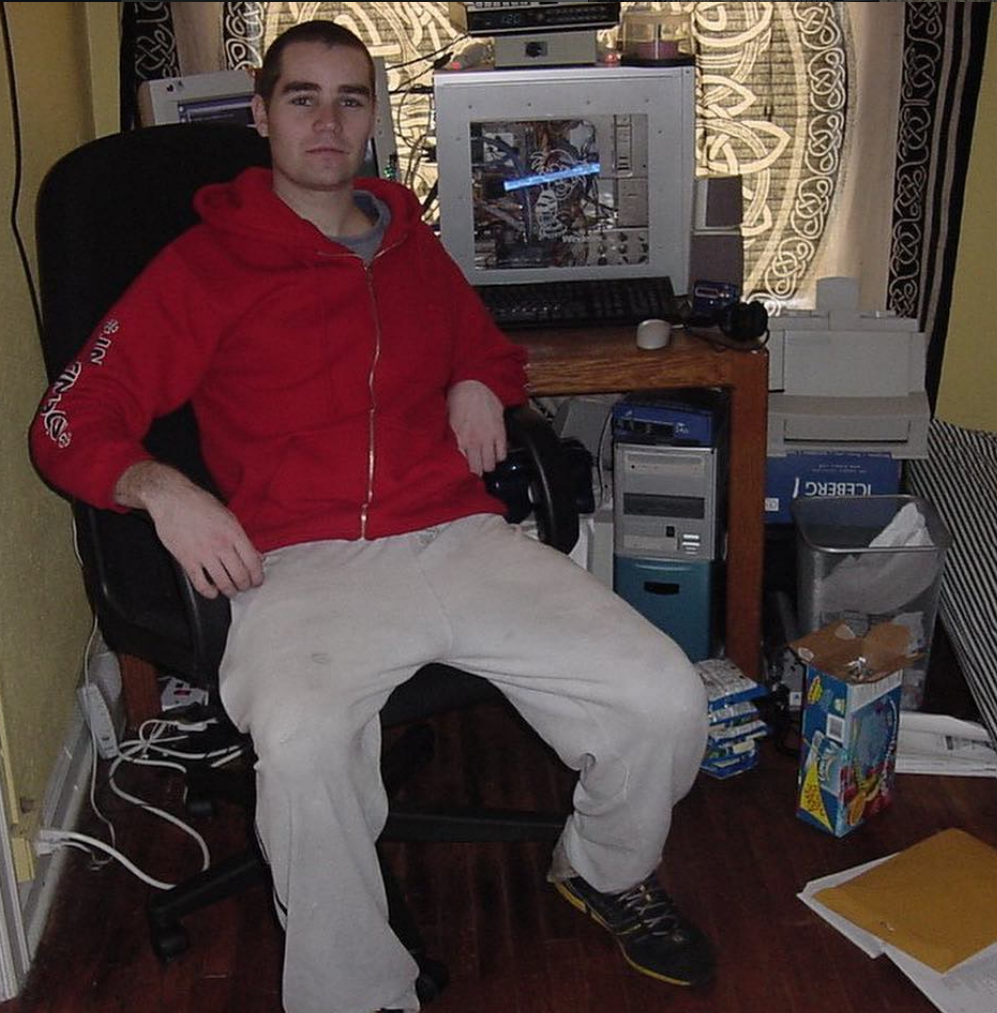
Here’s me in production mode, 2003: stack of Ramen, case of Capri Suns, and juggling 3 capstone research projects for my undergrad degree.

After decades of amateur production experience and years of daily practice, I’m starting to get to where I’m feeling confident enough to teach other people basic music production and share my experience and expertise. Music production is the most difficult thing I have ever tried; it’s been harder for me to figure out than working at Google or getting a college degree / Master’s degree. Learning music production has been harder for me than training for a marathon, 200 mile bike ride, or ultra distance swim. For me, music production is a full order of magnitude more difficult than DJing. I’m an above-average performer in terms of stubbornness, discipline, and intellect, and electronic music production has been very, very, excruciatingly difficult for me to learn. Probably the hardest thing I have ever learned and I don’t feel that I even get it yet.
Are you sure you really want to do this?
An additional warning on the difficulty of music production
I have needed to understand the following list of things to even begin to scratch the surface of intentional creation using computers:
- Learning how to use a DAW / workflow
- Arrangement
- Composition
- Mixing
- Sound design
- Music theory
- Sample management / library management
In traditional music recording and audio engineering, the roles were divided and the musicians creating music could focus on their respective areas of the songs:
- A songwriter would write the song
- A singer would sing the song
- A guitarist would learn to play and perform guitar
- A drummer would learn and play drums
- A bassist would learn and play the bass
- An engineer would record and integrate the music from the band
- A mixing engineer would handle the technical aspects of the studio such as preparing mics, instruments, and sound treatment for recording
- A mastering engineer would manage the outcomes from recording and prepare them for distribution and playback on radio or physical media
- And a producer would keep everyone on the same page and bring it all together
For any one of these jobs, you could get a degree and be growing professionally your entire career in that niche and never be done. When understanding how incredibly hard becoming an expert in every aspect of music creation and audio engineering can be, you have to also realize that you will not be as strong in every category of production as you could be. This is because with modern music production, all of these roles will from time to time fall onto a single person, you, and you have to wear all the hats and do all the things at different times, switching modalities. Anyways, I want to emphasize that if you’re realistically thinking about doing all this, you are signing up to do the most difficult thing ever and if you’re going to do it like I do it, you will be doing the work of an entire team by yourself just to make the music.
Over my music production journey, I have noticed that learning all these things came with a lot of side effects. My appreciation for music changed – I can no longer go to a show without thinking about how the producer engineered their music. I can no longer listen to music without trying to find inspiration for my own music in the groove of the drums, the sound design, and the engineering that went into the production I’m hearing. My ability to simply enjoy music has greatly diminished because I can’t turn off my producer brain when experiencing music.
For this reason, I think that people who want to produce (aspiring producers, maybe you?) should give serious thought into whether they actually want this that badly before putting in all of the time and potentially diminishing something they enjoy. If I knew what I now know – that I would spend thousands and thousands of hours producing, learning, and god knows how much money on lessons, gear, and software – would I go back and do it all over? If someone told me as straight as I’m telling you now, I feel that I would be a lot more weary knowing just how difficult the journey would be and if you’re considering this, you should be weary.
Becoming a producer is extremely hard and frustrating. In reflection and from this difficult process, I have learned that I just happen to love difficult and frustrating things. If given the chance to do it all over, I would probably make the same decision that those who proceed past this warning are making now and would do it all over in the same stubborn way that I have done.
I’ll add that surviving financially as a producer is extremely difficult. Even the mid-tier and high-tier producers in Bass music have to juggle multiple jobs, teach lessons, create content, and produce web sites to make ends meet. I made the conscious decision to save up money for decades before committing to music fully and although that move is not right for everybody it was what was right for me. Breaking-even in music – being able to buy groceries and cover rent in a shared living situation – is what you can expect at best in the first decade or so of being completely in the game. Expect to figure out ways of living very frugally should you choose the path of electronic music producer or do it as a side project until you have an emergency fund saved.
If I haven’t scared you away yet, you are in fact like me and would be willing to sacrifice your sanity out of a love for making music. Although there’s a lot to learn should you want to figure this whole electronic music production thing out, I’ll focus on the first step, Learning how to use a DAW / workflow, which will give you enough of a taste of the process to help you decide whether it’s right for you.
An opinion and choice of DAW
I have learned all the DAWs. I started in Re:Birth then switched to Reason then switched to Fruity Loops (if you’re reading this Gol, I bought a lifetime license for FL a very long time ago). I then got on a Pro Tools kick when my collaborator was producing rap tracks with it. Then I switched to Ableton Live (aka Ableton aka Live) because I wanted to DJ with it and ill.gates made a very dope APC40 preset. Then I switched to Logic because I bought a Mac and then I switched back to FL Studio because my Mac was stolen after I’d DJ’d a party in Los Angeles. Then I switched to Reason again because I didn’t like the music I made with FL. Then I eventually settled back into Live before switching to BitWig because it was supposed to be the new sauce. I eventually ended up going back to Live.
Every time I switched DAWs, I wasted a ton of time and energy relearning and remapping my workflow. All of the DAWs do the same thing in slightly different ways and have nuanced advantages and disadvantages. However, most of the people I have been taught by and have collaborated with use Ableton so I kept coming back to it.
If you want to learn the fundamentals from me, I’ll be teaching you the Live way because it’s what has given me the most success and fits the styles of music I work with. I’m completely ambivalent on the DAW I use but I main with Ableton Live because my collaborators and teachers use it and I’m old and tired of relearning and don’t want to waste the money and time it takes to switch.
I will be creating my lessons on Windows; I also have a Mac but it can get awkward to provide the keyboard shortcuts for both. For those on Macs, I’m apologizing beforehand – the keyboard shortcuts are roughly the same, you just need to mentally replace Control with Command in most cases and Alt with Alt/Option.
When the time comes, I recommend you pick a DAW that you’re willing to invest in and then stick to it and never change. All of them do the same thing. Changing is ultimately just expensive and unproductive.
For my lesson plan, presented a little later, I recommend you just use Ableton Live Intro until you are sure you want to do this. When you have exhausted all that can be done with Lite, I recommend you at this point decide if you want to go full ham with Ableton or pick another DAW to fully invest in for its built-in devices and workflow. The Studio edition of Ableton Live offers a lot more than standard in the box and to me is worth the upgrade over standard if you make it that far.
A major pitfall to avoid
Although it’s fun to use tons of plugins, using exotic tooling is a really bad habit and is not necessary to make good music. Many of your favorite producers never use anything outside of what comes in the box with their DAW. Many of your favorite tracks were probably produced using “scissors and tape” as ill.Gates says, referring to just copying and pasting audio. I’m going to encourage you to avoid getting any extra stuff until you have figured out how to use the fundamental tools. If the provided tools are not doing what you need them to do, you need to try harder to understand why instead of reaching for a different tool and wasting your time and money.
Because it can be tempting to believe that you are not using the tool you need, you can distract yourself from learning the important fundamentals that make all of the tools useful. You already have everything you need that came in the box with your DAW. Until you have exhausted the capabilities of those tools, you will not learn how to use the tools correctly and will create problems for yourself and your collaborators by doing weird shit with third party software.
You don’t need a hardware synthesizer, midi keyboard, 16-pad drum kit, or expensive plugin to make music with computers. These are all fun to play with but rarely are an essential part of writing music.
Furthermore, until you have realistically reached the limitations of the version of the DAW you have, don’t upgrade. I recommend using the Lite version of Ableton and the free soundcard that is already in your computer until you absolutely must get the additional features and then consciously make the choice to upgrade. If you think you need to upgrade to Live Studio and you have not yet completely rinsed the Drift, Drum Rack, and Simpler devices and a wavetable VST, then you probably should wait. If you don’t know what every device that ships with Live Intro does and don’t have compelling reasons to need the features of Standard or Suite, you are jumping ahead of where your level of knowledge is and are going to waste your time and money instead of building a foundation of knowledge to build on.

Which reminds me that the exception to this rule is that I think you should probably get a wavetable synth like Vital (free), Serum (worth its price), or Phaseplant / Current (elaborate and very fancy). Wavetable synthesis is very fun and powerful and all of these plugins come with an incredible library of presets which will give you better results early on in your journey. You should also install a visual spectral mixing tool such as Voxengo Span which will make analysis much more intuitive.
The new producer lesson plan
So if you want to do this, I’ll be creating a lesson plan for you. The plan is as follows:
- Part 1: Orient yourself by learning how to make simple beats in Ableton Intro
- Session vs arrangement view in Ableton
- Track key and BPM
- Make a bunch of simple 3-track beats with drums, synth, and bassline
- Create an Intro section and build it into a full beat section
- Drum kit for kick / snare / hat
- We’ll use sounds from a free Ableton Pack for bass and synth
- Part 2: Learn how to build tracks incorporating audio
- Audio tracks and warping
- Tuner and EQ3 for analyzing and managing parts of samples
- Learn how to use the simpler (sampler)
- Part 3: Learn the Live Intro devices and how they make it easier to create tracks
- Midi effects: arpeggiator, chord, scale, note length, and pitch
- Audio devices: auto-filter, beat repeat, reverb
- Learn how to create more compelling track sections with these devices
- Part 4: Learn some basic mixing
- The channel mixer section in Ableton
- Spectral mixing: Channel EQ, EQ3, and Filter
- Amplitude mixing: Clipping, compression, limiter, and gate
- Part 5: Expand on simple beats to build more parts
- Synthesis of sounds with drift and vital
- Midi devices: note length, velocity, and random
- Audio devices: Phaser-flanger, redux, erosion, saturator, chorus-ensemble, utility
We’ll be able to cover *all* of this with just Ableton Live Intro. After you have a strong understanding of these concepts, you will be free to go on about your production journey with some fundamentals under your belt. If you’re interested in following along, hang on for Part 1’s content with getting started instructions and the first lesson.
If, as part of your learning journey, you’re interested in getting projects for songs I have released, I’m happy to share my Ableton project files with you but I’ll warn you that they probably will not load for you as pretty much everything I’ve released is very old and created with versions of plugins that may not even be available any more. I am not going to fix them so that they’ll open for your specific setup. Email me “projects at ourfriendgus dot com” with the song title in the subject and I’ll send you the goods.
References and resources
I learned all of this from my teachers and can not take credit for what I’m teaching. If you want to learn from the people who taught me, please check out the following masters curricula (in chronological order of when I discovered them):
For more learning resources, you can check out the Patreon pages for some folks I follow (in alphabetical order):
I’m presently unavailable for lessons, but you can try the Producer Dojo, Encanti, or Gravitas Create for facilitated options and my friend Cryptochronica is also providing lessons. If you know me, and I’m forgetting you’re offering lessons, let me know so I can add you.
For those following along, check back for the part 1 exercise.